
Steps to Create a Deal directly from the Deal Pipeline
1. Double check that your Company (client or prospect) exists. This is required to create a deal.
2. From the global navigation, go to CRM → Deals.
3. In the top right, click Create Deal
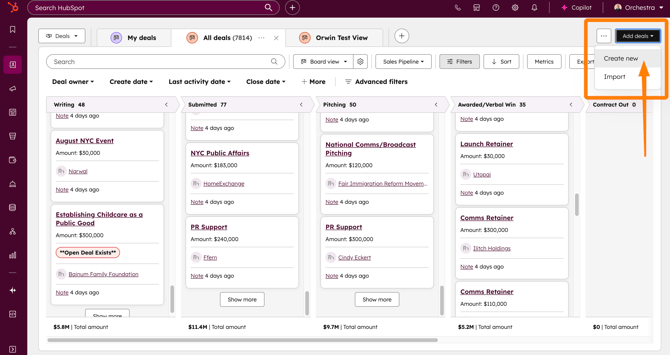
Fill out the Create Deal form with as much detail as possible.
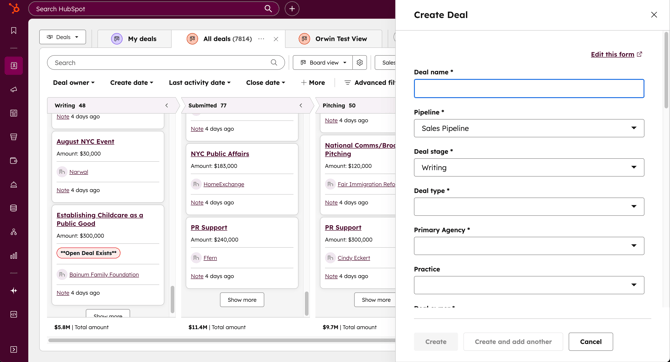
These are the required fields for the Create Deal form:
-
Deal Name → Use a clear, standardized naming format (e.g., Client – Project – Q1 2025).
-
Pipeline → Defaults to Sales Pipeline.
-
Deal Stage → Defaults to Writing (first stage).
-
Deal Type → Select from New Business, Upsell, Cross-Sell, Renewal.
-
Primary Agency → Select from dropdown.
-
Deal Owner → Assign yourself or the appropriate team member.
-
Estimated Budget (Total Contract) → Enter budget or placeholder
-
Line Items budgets are required at the Submitted stage or later. See instructions on how to create line item budgets here.
-
-
Estimated Close Date → The date we expect a decision to be made on this deal
-
Estimated Start Date → The date we expect to kickoff the work
-
Estimated End Date → The date we expect the contract/deal to end
-
Deal Association → Associate to the correct Company
Company is the Client or Prospect NOT the agency you work for.
These are the optional (but encouraged) fields to improve visibility:
-
Practice → Relevant agency practice
-
Team Lead (CRL) → Assign if known
-
Growth Lead → Only the Growth Team can assign themselves to a Deal
-
RFP? → Mark Yes/No if opportunity involves a formal RFP.
-
Contact Association → Add the primary contact for the deal
When all required fields are entered, you can click Create to add the Deal to the Sales Pipeline.
✅ Best Practices
-
Always associate the Deal with at least one Company and one Contact. This ensures activity logs and reporting tie correctly.
-
Complete required fields accurately—missing or placeholder data can create downstream issues in forecasting and reporting.
-
Use standardized Deal Names so opportunities are easy to find in search and reports.
🏁 Quick Reference 🏁
-
Navigate to CRM → Deals → Create Deal
-
Enter all required fields
-
Fill as many optional fields as possible
-
Click Create and confirm the Deal appears in the Sales Pipeline