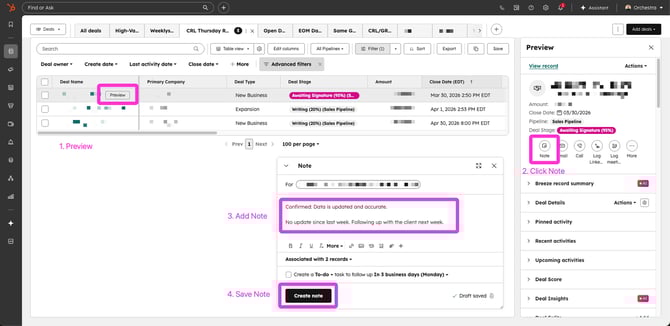
While CRLs typically also serve as the Deal Owner, even when you are not, you are ALWAYS accountable for the data of your deals and clients.
By end of day Thursday, CRLs are expected to review their pipeline and actively note that each deal is up to date—inclusive of new business and expansion. Renewal deals are only included on the first Thursday of the month. This task is required of anyone assigned to a deal as CRL, regardless of their actual title.
Here's how to conduct your review:
- Review your open deals that are assigned to you as a CRL (helpful HubSpot view HERE)
- If there any deals missing, please add them to HubSpot. Remember that all new business and expansion deals will be in the Sales Pipeline, and all renewals will be in the Renewals Pipeline.
- Confirm that these data are accurate:
- Stage
- Amount
- Close Date (the day the client has committed to the scope and budget of our project we know we win/move to 75%)
- Estimated Start Date
- Estimated End Date
- Deal Type
- GRL, CRL, Deal Owner
- Vertical, Agency, Practice
- Add note to the deal confirming your review each week; this is easily done directly from the report view linked above.
- This note should be 2-3 sentences and give a quick synopsis of the last touchpoint, next step, and the likelihood of winning the deal.