
What are they and how do we use them?
|
Definition |
Usage in HubSpot |
Purpose |
|
|
Dashboard |
A dashboard is a collection of reports and visualizations that provide streamlined key metrics, trends, and data points. Dashboards are used to monitor performance, track progress, and support decision-making across teams. |
Dashboards offer a high-level overview of pipelines. |
To provide a summary view of important information, often with charts, graphs, and key performance indicators (KPIs) that update in real time or near real time. |
|
Views |
A view in HubSpot is a customized way of looking at a specific set of data objects (such as contacts, companies, deals, etc.). Views allow users to filter, sort and display only the data that is relevant to them. |
When you click into any CRM data object (like deals or contacts), you get an index page that looks like a spreadsheet. You can edit which columns are shown, apply filters and even save these settings as a personal view for future use . |
To allow users to focus on specific subsets of data and tailor the display to their needs, making it easier to find and work with relevant records. |
|
Reports |
A report is a specific analysis or aggregation of data, often visualized as a chart or table. Reports can be added to dashboards or viewed individually. |
Reports are created to answer specific business questions or track particular metrics. Multiple reports can be combined into a dashboard for a broader overview. |
To provide detailed insights into particular aspects of the business, such as sales performance or deal pipeline status. |
How to view them:
For dashboards and reports, hover over the reporting icon on the left-hand side navigation bar.
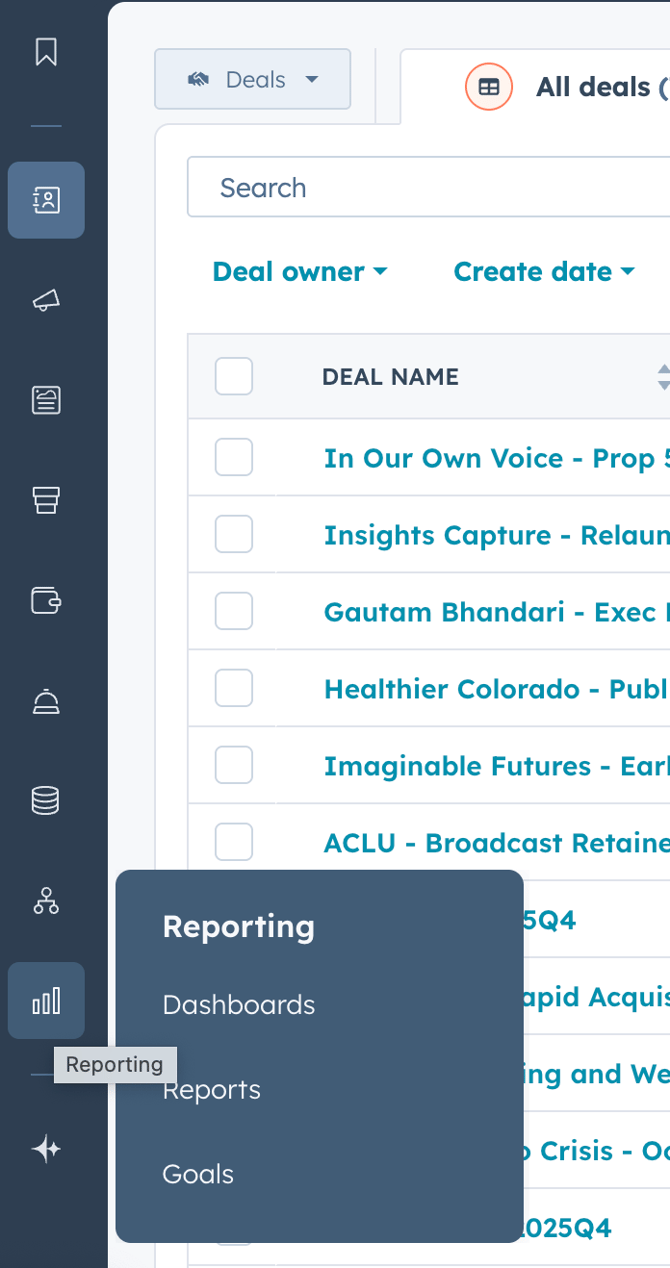
For views, navigate to the CRM data object of your choice and click on the plus sign in the upper right hand corner.
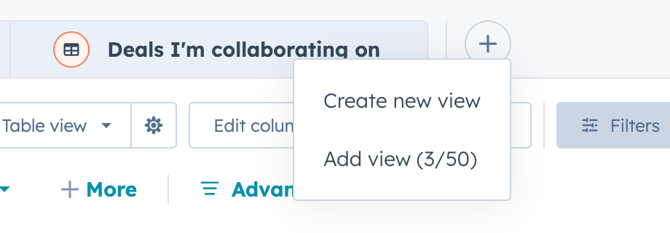
Check out Custom Saved Views to learn about the views we recommend you add/make!